
Version 1.0
|
 |
JProWeb
When it comes to getURLs and Projectors, do these questions come up time
and time again?
 |
How can I open a browser Window without any toolbars?
|
|
Why don't the web links work in the Projector file?
|
|
How can I create a specific-size window?
|
|
How can I create a non-resizeable window?
|
Now you can look to FlashJester for the answer. The new JTool, JProWeb,
is here to solve all of your browser window problems. FlashJester's collection
of JTools pump up the performance of your Projectors. These tiny add-ons allow
you to add features that Macromedia left out! So let's tell you more about the
latest, JProWeb.
JProWeb allows you to launch browser windows, also known as Popups. JProWeb works
just like the Javascript command Window Open and gives you:
|
Control over Width and Height
|
|
Ability to specify Top and Left values as to where the Window will open up
on the screen
|
|
Option for Full-Screen
|
|
Toolbar, Menubar, Scrollbars and Status Control
|
Here are the key JProWeb features:
Version 1.0
|
Supports all versions of Macromedia Flash including MX
|
|
Works on Windows 95/98/ME/NT/2000 and XP
|
|
Compatible with all the browsers that support Javascript: IE, Netscape, Opera
|
|
Compact Tools - only 20kb in each -- and you need only one copy for all your
links
|
|
No MS-Dos boxes
|
|
Unlimited distribution
|
JProWeb lets you take charge of browser windows in your Projectors. Now you can
open browser windows without a toolbar and control the size of the window. It
works just like the Javascript command Window Open.With JProWeb, you get control
over the width and height of the browser window and where the browser opens onscreen,
since you can specify top and left values. There's also an option for full-screen
and control of the toolbar, menubar, scrollbar and status bar.Whether your browser
of choice is IE, Netscape or Opera, you can count on JProWeb compatibility. And
wait until you see the compact size - only 20 kb - and you only need one copy
for all of your links. Plus you get unlimited distribution. You get all of this
without MS-Dos boxes.
JProWeb and all FlashJester products support
Flash 3/4/5/MX/MX 2004/8 and Windows 95/98/ME/NT/2000 and XP
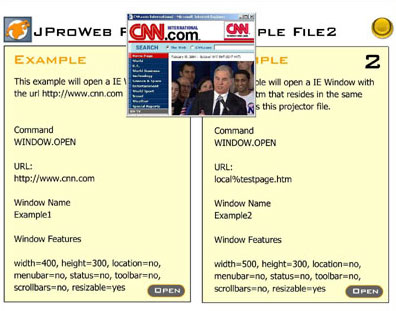
Screenshots
|


 FlashJester.com
 Tricks























 I just want to say after working on a project with JMovie, that I am really impressed with this product. It works very well. I love the control I have over videos in CD-ROM projects now that I have JMovie and Jugglor. Thanks for your excellent development, software, and service.


