Ready for a show-stopping Flash development ?
Then step right up because the astonishing new Jugglor version 3.0 is ready to turn your Flash files into stand-alone programs that amaze, entertain and deliver an ever so important professional edge. There's no need for multiple programs to keep the show going, because Jugglor provides you with the flash tools you need to make the most of Projector files and now SWF files, too! If you've checked out Jugglor in the past, it's time to look again, because with version 3.0, Jugglor has an all new act. If you're new to the scene, then welcome to the best Flash juggling performance yet. There are now two Jugglor products available, Pro and Standard, so you can choose the one with the features you need.
What's new with Jugglor v3.0
Microsoft Vista Compatible
Supports all version of Vista, Basic, Home Premium, Business and Ulimate. 256x256 icons are also supported. We've also put tremendous investments to ensure backward compatibility with Windows 95/98/NT/ME/2000/XP.
Adobe Flash CS3 Compatible
Supports the new updated Flash Player 9. Flash 9 Player supports Flash ActionScript 3 and Adobe Flex 2. Adobe Flash Player 9 is the high-performance, lightweight, highly expressive client runtime. So we've had to adjust Jugglor slightly for this new change.
NEW Scripting support
NEW Scripting support using Classes/Events using Flash Actionscript 2 and 3 - Event Driven Scripting Model. With improved performance and usability.
SWF to Projector Files
Allows you to auto creation of MX, MX 2004, Flash 8 and CS3 Projector files from a SWF file. For non Flash and Flash users.
NEW Security feature
Direct Read file - Now any Additional File can be directly read from the Juggled exe, no need to extract to the hard drive
NEW GUI
We've change the GUI slightly to give it a fresher look.
Gamepad/Joystick now supports 32 buttons
Thats right you've asked for it and we've added it.
CUSTOMISE- Expiration Message
Change the font, background colour and size.
CUSTOMISE - Message during extract
Change the progress bar and text colour and font.
Widescreen Support
Added support for widescreen 16:9 (and other) ratios in full-screen sizes - Stretch Movie to Fit Window , for Projector devices and Plasma screens.
NEW in Version 2.2
Clone Monitor Support
Let's improve Flash software !
If you want to display the exact same Flash file on a group of monitors, Jugglor 2.2 will now handle it with clone monitor
support. No extra hardware or software is needed. One monitor gets designated as the lead monitor and this is the one the
operating system sees. From there, Jugglor 2.2 will allow the content to be copied over to multiple monitors for presentations
or displays. Jugglor 2.2 acts behind the scenes so as far as the operating system or application is concerned, there is only one
monitor in play. If you're using a group of the same monitors, you can expect each monitor to have the same display resolution
and color depth as the lead monitor.
Flash 8 Compatibility
Macromedia just launched its biggest Flash release to date, Flash 8, with great new features and benefits. For more details go
to www.flash.com and see what to expect from Flash 8. Due to the new release, we updated our Flash Projector engine to make it
compatible with the new Flash 8 Player.
You will need to update Jugglor 2.2 to work with Flash 8 files.
Create custom JTool Flash Plugins/DLL
Let's improve Flash development !
It's finally time to introduce the feature that's been requested the most.
Are you ready ? Now you can create your own dll's or JTool to add your own functionality to Jugglor. Now all Delphi, C++ and VB
developers can write their own routines and link directly into Jugglor. You've been asking for and now you have it!

Jugglor Steps up Security
Now you can keep your Flash files protected from hackers with a new feature...
Jugglor's Border Skin Designer
Create custom frames, borders and skins.
Friend of Flash MX
Complete compatibility with Flash MX 2004 so you can keep on Juggling !
Interactive Interface
Jugglor has a new look complete with Flash menus to make the entire application a truly interactive experience.
Easier Automation
Import/Export Jugglor Projector files to normal text files, so user can easily automate the Jugglor build process with Command line feature.- Control Jugglor via servers and batch processes. Not web servers.
Nice Package
- Create Open/Save Packaged Projects.
- Package up ALL the files and resources used in your Jugglor projects and distribute them more easily within your team.
Engine Duo
- Get engine support for both
SWF and Projector Files - choose the engine best for you.
Play SWF files using the Flash Active X Plugin.Play Projector files using Jugglor's new improved engine.
For more details about the 2 types of engine and why, please read this.
Active X Installation
- Choose from 2 options to help end users who don't have the Active X Plugin - don't mess around with DLL's, experience clean & simple installation.
- Include Active X Plugin Installation inside the final Juggled file OR
- Include direct link to www.macromedia.com and activate download from there - it's all automated.
*Shape Up Flash with Transparency
- Control the look of any Flash file with new Dynamic Shaping - add a shape to any Flash file just by creating a transparent colour of the shape around the existing shape.
- Add multiple transparent shapes to the mix and the engine will handle your Flash file's transformation from shape to shape - it's dynamic action at its best.
- No need to clip and select regions -- it's very easy to use.
- Support TRUE Desktop transparency 32, 24 and 16 bit with anti-aliasing, on all, yes all, OS Win 95/98/ME/NT/2000/XP.
- On a side note, it took well over 12 months to develop and test, and we finally got it. Thanks to clever programming, it uses a minimum amount of CPU processing time - less CPU than the Macromedia projector in normal mode.
Create your own Flash mp3 Player
- You can create your own
flash mp3 player using Jugglor software and let users download your custom mp3 flash player.
- Create audio
flash buttons.
- Create audio
flash intro.
*Ticker Technology
- See it here first! Create a Flash ticker and Jugglor lets it stick and resize to the top or bottom of the screen and recognises the Windows around it.
- Check out the example file in Examples/Ticker and see what this clever feature will do for you.
*Toy Power - Create a Flash Desktop Toy / Deskmate
- Give new life to your Flash-created characters and turn them into cartoon Desktop Toys -- drag, drop, bounce, add falling & random events and move the character any way you wish in the Flash FLA file.
- Get control of your flash characters with special written commands and Macromedia Actionscripts or let Jugglor control the movements.
- Select predefined movements and events, and talk directly to the characters.
Here's a sample of what you can do:
- Throw It - relax, no one will get hurt! Pick up the toy, throw it around the screen and watch it react to the speed of your throw and bounce off the sides of the screen.
- Random Move - see the toy recognise the windows and move on top of them, fall off the window's edge and more.
- Bounce It - keep the little guy on the move and bouncing around the screen at an adjustable speed.
- Check out the Desktop Toy examples give here :
Examples 1
Examples 2
*Flash Joystick and Flash Gamepad Support
Game developers rejoice as Jugglor now has flash joystick and flash gamepad support that works on all Windows OS
Screen Scene
- Achieve Full-Screen Resolution - specify the way YOU WANT your Juggled files to run: 320x200, 320x240, 512x384, 640x480, 800x600 and/or 1024x768. Try it to run games, maintain the speed and not depend on the user's screen resolution.
- Show a Splash screen in the delay specified with a normal or transparent bitmap - just before the Juggled file appears. While application loads, it uses JShapor to create the transparency. See http://jshapor.flashjester.com/.
- Move beyond one screen with Multi-Monitor Support feature and stretch the Flash file onto many monitors.
File Focus - Zip & *Self-install
- Create Zip File - now you can zip up your Juggled files.
- Build self-installing files and experience this big feature for Jugglor v.2.2: develop and deploy applications onto user's desktop with ease and check out the customised installation -- images, text, dialogs, readme files, support multiple languages, etc. No need to use a third party installation tool.
*Template Takeover
Check out new predefined templates for the side install images by clicking on the side bitmap.
Click It
- Add pop-up menu on left click menu.
- More options on right click menu.
Specialised Set-Up
Control set-up box customisation with just a double click on the text and edit as you like - plus get a smart, automatic text wrap.
New Capabilities & More Things to Control
- Force 16 bpp - Forces the color resolution to be set at 16 BitsPerPixel - Color quality to 16 bit.
- Disable/enable the shortcut keys with new Default Keyboard Shortcut.
- Edit icon and labels in Settings Box.
- Have option to Don't Show in Taskbar.
- Allow one instance -- user can only run ONE instance of any Juggled file.
- Alert user of large files inside the Juggled file with automatic message that appears during extraction.
- Sit in Icon Tray option is now available.
- Start minimize in Icon Tray.
- Automatic generation of the Autorun.inf file and specifies icon too.
- Put icon on user's desktop once Juggled file has run.
- Specify different names for both Title and Filename.
- Drag on actual Flash control.
- Make your Juggled files run when end user starts their computer.
- Remember Windows position and size on exit.
- Create uninstall icon.
- Run Flash Projectors after installation.
Other great features:
- Supports Windows 95/98/NT/ME/2000/XP/Vista.
- Jugglor fully supports Flash 3, 4, 5, MX, MX 2005,8 and CS3.
- Add More functionality with JTools! (hotspot Jtools to http://jtools.flashjester.com/).
- Silicon Realms - Armadillo Support - Realms delivers a new technology that drives global sales while protecting your digital assets with Software Passport.
- TOTALLY custom window!
- Eliminates the top menu.
- Forces full screen or open in a custom window.
- Sets the window to always be on top.
- Features option to quit on ESC key press.
- Provides no menu option when you right click.
- Offers choice to display a right click menu with "Close","Setup", both or neither.
- Changes the icon of the Projector file.
- Makes the whole window draggable.
- Allows addition of a media files (*.mid;*.rmi;*.mp3;*.wav;*.snd;*.au;*.aif)
- Features on/off interaction option.
- Features quick and easy to use interface.
- Disables Windows and Tab key.
- Disables screen saver when Projector file is played.
- Changes the modified date of the Projector file.
- Support all MM commands like POST, XML, Shared Object, LoadMovie, etc.
- Ability to select default Macromedia right click menus.
- Expire the Flash file on certain date, number of executions or days.
- Authenticate your Juggled files with Authenticode.
- Disable Print Screen
- Hide Cursor
- Alignment of Flash file on startup
- Stay on Top
- Command Line Parameters to Juggled Files
 |
 |
Jugglor's waiting to bring its act to your SWF and/or Projector files. Wondering what you do with it? Check out the numerous possibilities.
Upgrade from 2.1 or 2.2 to 3.0 All existing users can upgrade to 3.0 for only $199 for Pro $99 for Standard. If an email hasn't been sent to you telling about the upgrade then please
click here.
Upgrade from 1.1d to 3.0 All existing users can upgrade to 3.0 with a 20% discount so it cost around $279 for Pro $179 for Standard. If an email hasn't been sent to you telling about the upgrade then please click here.
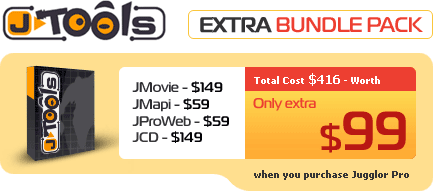
Introducing the new Jtool Extra Bundle with JMovie, JMAPI, JCD and JProWeb - all together for just $99 when you buy Jugglor PRO v3. You'll save a bunch of money (that trio of J-Tools retails for a total of $267!) and get access to these cool, tiny and-ons that bring more power to your Projectors.
|


 FlashJester.com
 Tricks










 JCD
JCD
















 Thank you very much for the easy handling - I appreciate that! It works fine now. BTW - your products are great and we love to work with them.


