
Build
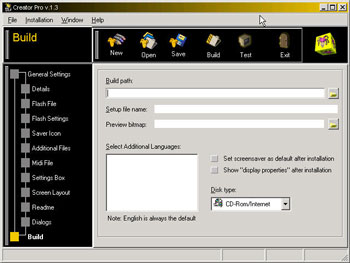
This is where all the options that you have set
in the previous sections are put together to produce the screensaver. Here, you
will be able to decide where the screensaver is built. When it is built it is
separated into two directories, one containing the installer with the screen saver
inside, and the other contains just the screen saver for if you wish to use a
3rd party installer.
You can also choose the format which
your screen saver will be distributed by. If it is by 1.44MB Floppy disk, then
your screensaver's install file will be broken down into disk sized portions.
If you choose CD-ROM/Internet, it will create just the one .exe install file.
When the install has finished, you can choose if the screen saver is made the default screensaver on the users machine. Also, you can open the display properties and send it directly to the screensaver tab.

|


 FlashJester.com
 Tricks





















 "Screensavers are cool - but did you know that creating them is as easy as filling out a form? Flashjester Creator is THE tool for you: easy interface, amazing functionalities and as a result, combined with Flash, professional screensavers! Creator is a bargain that you mustn't miss!" I like your Sitedesign very much, I just browsed the Html-section on Flashjester again and I love it: the pics naming the tools are great, compliments! We are going to do another screensaver in the near future for a sports company, we are looking forward to that. We'll be contacting you.


